
Product review
Elgato Stream Deck Neo Review: 8 Keys for Editing (2026)
We may earn a commission when you buy through links on this page, at no extra cost to you. Affiliate disclosure
The Stream Deck Neo suits editors and creators who want 8 LCD shortcut keys and 2 page-switch touch points on a small desk. Skip it if you need dials for scrubbing or more than 8 keys visible at once.
Who this helps: This review helps you decide whether the Stream Deck Neo fits your editing or streaming shortcuts. It is desk research from Elgato documentation, not a hands-on test, and app support depends on Elgato's software and plugins.
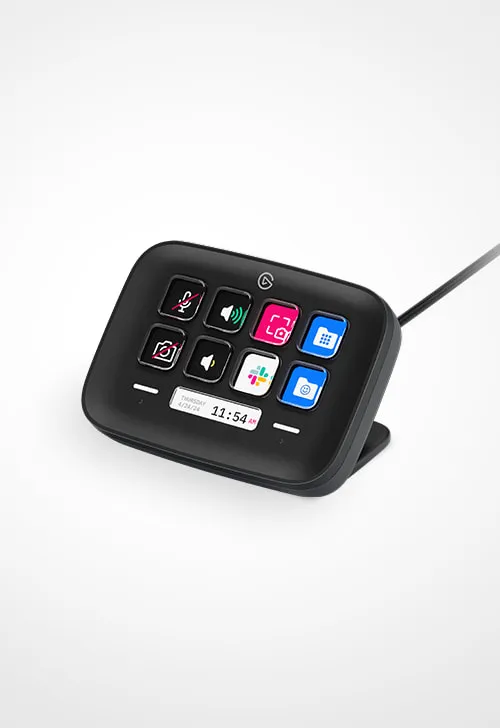
Product at a glance
Elgato Stream Deck Neo
A small 8-key LCD controller for editors and creators who want their most-used shortcuts as labeled keys and switch between pages with touch points.
- LCD keys: 8 customizable
- Touch points: 2 (page navigation)
- Infobar: Customizable display strip
- Dimensions: 107 x 26 x 78 mm (W x D x H)
Verdict: who the Stream Deck Neo is for
The Stream Deck Neo is a good fit for people who use a handful of shortcuts constantly and want them as labeled keys rather than keyboard combinations. Elgato lists 8 customizable LCD keys, 2 touch points for switching pages and a customizable Infobar.
Eight keys cover the core of most editing sessions: cut, ripple delete, add marker, render, and a few app switches. The touch points flip between pages, so one device can hold separate sets for editing, color and export.
If your work depends on scrubbing, jog or adjusting values, a controller with dials is a better match. If you want 15 or more actions visible without paging, a larger Stream Deck saves page switching.
Verified specifications
The Neo has 8 LCD keys, 2 touch points and an Infobar in a 107 x 26 x 78 mm body that weighs 210 g.
| Attribute | Stream Deck Neo |
|---|---|
| LCD keys | 8 customizable |
| Touch points | 2 (page navigation) |
| Infobar | Customizable display strip |
| Dimensions | 107 x 26 x 78 mm (W x D x H) |
| Weight | 210 g |
| Operating systems | Windows and macOS |
Elgato's help center and its regional product pages list different minimum operating system versions. Check the current requirement on Elgato's site for your computer before you buy.
Editing workflow: what 8 keys can hold

Eight keys work best when each page has one job, and the touch points move between those pages. The image shows how dedicated macro keys sit next to a keyboard on a typical desk.
| Page | Example key set |
|---|---|
| Edit | Cut, ripple delete, add marker, nudge left, nudge right, undo, play, full screen |
| Color | Previous clip, next clip, bypass grade, add node, compare, reset, copy, paste |
| Export | Render queue, export preset, open folder, upload app |
Our step-by-step guide on how to map timeline shortcuts to a Stream Deck shows how to assign these actions and test them. Start with the shortcuts you press most, then add pages once those feel automatic.
Desk fit and the Infobar
At 107 mm wide and 210 g, the Neo fits beside a keyboard or in front of a laptop without taking much space. Its small footprint is the main reason to pick it over larger models on a crowded desk.
The Infobar is a strip that can show information you choose, such as the time or a page name, so you know which key set is active. That helps when you rely on the touch points to switch pages often.
Plan where the cable runs before you place it. A short USB path to the computer keeps the desk tidy, and a fixed position helps your hand find keys without looking.
Strengths and limitations
Strengths are the compact size, labeled LCD keys and page switching; limits are the key count and the lack of dials.
- Strengths: 8 LCD keys with custom icons, 2 touch points for pages, an Infobar and a 210 g body.
- Limitations: no dials for scrubbing or value adjustments, and only 8 actions visible at a time.
- Unknown from the documentation we checked: which plugins your exact editing app version supports, which changes with Elgato's software.
Editors who mostly click a small set of actions get the most value. Editors who adjust audio levels, color wheels or timeline position all day should compare models with dials.
Alternatives to consider
Choose a different controller when you need more visible keys, rotary control, or a dedicated editing surface. The right alternative depends on how you work, not on brand.
- More keys at once: larger Stream Deck models show 15 or 32 keys, so you page less often during long edits.
- Dials for adjustments: a Stream Deck with dials, or a controller built around rotary encoders, suits scrubbing, audio levels and color work.
- Editing-specific hardware: some editing apps sell their own keyboards and jog controllers with fixed labels that match the software.
- A programmable keyboard: if you only need a few macros, assigning shortcuts to spare keys on a keyboard you own costs nothing extra.
Compare options on key count, dial count, supported operating systems and the plugin for your editing app. Those four points decide whether a controller speeds up your work or sits unused.
Before you buy: checklist
Use this list to confirm the Neo matches your setup.
- Your computer meets Elgato's current minimum Windows or macOS version.
- Your editing app is supported by the Stream Deck software or a plugin.
- Eight keys per page cover your most-used shortcuts.
- You do not need dials for scrubbing or adjusting values.
- You have a spot on the desk within easy reach of your dominant hand.
FAQ
How many keys does the Stream Deck Neo have?
Elgato lists 8 customizable LCD keys plus 2 touch points that switch between pages of keys. With pages you can hold far more than 8 actions, but only 8 are visible at once, so group them by task such as editing, color and export.
Does the Stream Deck Neo have dials?
No. The Neo has keys, touch points and an Infobar, not rotary dials. If you want dials for scrubbing, volume or adjusting values, compare it with Stream Deck models or other controllers that include them.
Will the Stream Deck Neo work with my editing software?
It works through Elgato's Stream Deck software, which can send keyboard shortcuts to almost any app and offers plugins for some editors. Check Elgato's plugin listings for your exact app and version, and confirm your operating system meets the current minimum.
How big is the Stream Deck Neo?
Elgato gives the dimensions as 107 x 26 x 78 mm (width x depth x height) and the weight as 210 g. It is one of the smallest Stream Deck models, which suits a crowded desk or a laptop setup.
What is the Infobar on the Stream Deck Neo?
The Infobar is a small display strip you can customize to show information such as the time or the name of the current page. It helps you keep track of which key set is active when you switch pages with the touch points.
Sources
Ready to decide?
Check the current listing for the Elgato Stream Deck Neo on Amazon.
View on Amazon